
Step 1 of 6
Give the agent its own workspace
One parent folder, one folder per task. A wrong write then has an address, and you always know where to look first.
How it goes wrong
It does not fail at the start. It fails at handover. The agent writes the file somewhere reasonable to the agent, you cannot tell whether the one you opened is the one it just made, and the folder it chose is one the app owns rather than one you own. Three tasks later the same folder holds three jobs' worth of output, none of the timestamps line up with the chat, and the one file you need has a name like output (3).md.
Nothing here is a disaster on its own. The cost is the ten minutes of searching before each task, every task, plus the day you cannot prove which version you sent. The steps below exist to make that search unnecessary, not to clean it up afterwards.
What it costs when you skip it
The bill arrives in small pieces. A file the agent made is somewhere between Desktop, Downloads and the folder you thought you were in. You search by name, then by date, then by content. The agent says it saved it; the chat scrolls away; the search returns eleven candidates.
Nobody bills you for that hour. It is simply an hour you did not get back, and it repeats every task until the folders are fixed.
Do this
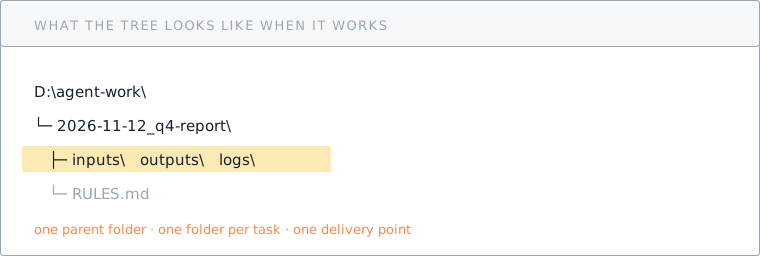
- Make one parent folder on a second drive. On Windows,
D:\agent-work. On macOS,~/agent-workif your home folder is not on a small system volume. One parent, not three. - Make one folder per task inside it. Name it
YYYY-MM-DD_task-name, for example2026-11-12_q4-report. The task name is what you would say out loud, not the tool name. - Create three subfolders in every task folder:
inputs/(what you gave it),outputs/(the only delivery point),logs/(disposable run notes). - Open the agent with that folder as its working directory. In a terminal,
cdinto it first. In a desktop app, use the folder picker and confirm the path it shows before you type anything. - Say the boundary in the first message: "Work only inside this folder. Do not read or write anywhere else. If a step needs a file outside it, stop and ask."
- Keep one
RULES.mdin the task folder. The delivery rule for step 2 goes there, so the next session starts with the same rules without you retyping them.
Checklist
Common mistakes
- Launching from the home directory and hoping. A relative path written from the wrong starting point lands in a folder you will not check. Set the directory first, then talk.
- Putting the workspace on the Desktop or in Documents. Both are synced by cloud storage on most machines. Now every large output uploads itself, and a delete syncs too.
- Making a workspace inside someone else's project. If the folder is a repository you care about, an agent's cleanup pass can reach source files. The workspace is a sibling, never a child.
What you need for this step
Nothing to download. The folder layout, the naming rule and the exact prompt are in the delivery rules pack, which covers steps 1 and 2 together.
The pack goes out by email rather than as a download. Signed in, it goes to your account address; otherwise tell us where to send it.